


ImJa 솔루션


ImJa 보드에서 자바 언어를 사용하여 UDS 통신하는 방법을 알아보겠습니다. UDS는 Unix Domain Socket의 약자로 이름에서 알수 있듯이 유닉스에서 사용하는 내부 프로세스끼리 통신하는 IPC 중 하나입니다. 즉, 같은 시스템 안에서 실행하는 프로세스 사이에 데이터를 주고받는 통신 방법이지요.
UDS는 매우 편리한 IPC 방법 중 하나이지만, 유닉스에서만 사용하는 방법이라 크로스 플랫폼을 지원하는 자바 프로그램에서는 아마도 생소할 것입니다. 아마도 자바에서는 프로세스끼리 통신해야 한다면 UDP/IP를 사용할텐데, UDS는 UDP/IP보다 훨씬 가볍고 IP 주소 대신에 파일 이름으로 상대방을 구별하기 때문에 사용하기도 편합니다.
이름부터 UDS라서 UDP/IP와 같은 것이라고 생각하는 분도 계시지만, UDP/IP 방식뿐만 아니라 TCP/IP식으로도 사용할 수 있습니다. UDS에 대한 자세한 설명은 아래 글을 참고하여 주십시오.
http://forum.falinux.com/zbxe/index.php?document_srl=406064&mid=network_programming
UDS를 TCP/IP 또는 UDP/IP 방식으로 선택해서 사용하지만, 대부분 UDP/IP 방식으로 사용합니다. 전송한 만큼 데이터를 받아서 처리하는 것이 편하기 때문이지요. ImJa보드에서 제공하는 ImJa 라이브러리도 UDS를 UDP/IP 방식으로 제공합니다.
아래는 UDS 통신으로 문자열 데이터를 받으면 에코하는 예제입니다. UDP/IP는 IP 주소로 타겟을 지정한다면, UDS는 내부 프로세스끼리의 통신이라서 IP 주소로는 구별할 수 없어서, 각 프로세스별로 서로 다른 파일 이름을 사용하게 됩니다. 예제를 보시면 UDS 통신 객체를 생성할 때 파일 이름을 사용하는 것을 볼 수 있는데, 다른 프로세스는 이 파일로 데이터를 전송하면 해당 프로세스에게 전달됩니다.
package udsSample;

import java.nio.ByteBuffer;
import com.falinux.imja.Poll;
import com.falinux.imja.Uds;

public class UdsSampleMain extends Uds {

    private Poll poll = null;

    private final ByteBuffer bufUdpRead = ByteBuffer.allocateDirect(1024);
    private final ByteBuffer bufUdpWrite = ByteBuffer.allocateDirect(1024);

    /**
     * UdsSampleMain
     * @param udsFileName
     */
	public UdsSampleMain(String udsFileName) {
		super(udsFileName);	// Uds 오브젝트 생성
		poll = new Poll();	// 통신 라이브러리 초기화
		this.open();		// Uds open
		poll.rebuild();		// 통신 객체 목록 갱신
	}

	@Override
	public int onRead(long handle) {

	     int readBytes = this.read(bufUdpRead);	// 수신된 데이터 읽기

	     byte[] buf = new byte[readBytes];		// byte배열 설정

	     bufUdpRead.flip();						// 읽은 데이터 설정
	     bufUdpRead.get(buf);					// 데이터를 byte배열에 설정
	     System.out.print("received:");			// 받은데이터 문자열 출력
	     System.out.println(new String(buf));	// 받은데이터 문자열 출력
	     bufUdpRead.compact();					// bytebuff포지션 재설정

	     bufUdpWrite.put(buf);					// 받은 데이터를 송신 버퍼에 설정
	     bufUdpWrite.flip();					// 송신 데이터 설정
	     this.write(bufUdpWrite, "/tmp/2nd.uds");// 데이터 송신
	     bufUdpWrite.compact();					// 송신 bytebuff포지션 재설정

	     return readBytes;
	}

	@Override
	public int onWrite(long handle) {
		// TODO Auto-generated method stub
		return 0;
	}

	@Override
	public int onError(long handle) {
		// TODO Auto-generated method stub
		return 0;
	}

	@Override
	public int onHup(long handle) {
		// TODO Auto-generated method stub
		return 0;
	}

	@Override
	public int onTimeOut(long handle) {
		// TODO Auto-generated method stub
		return 0;
	}

	@Override
	public int onDisconnect(long handle) {
		// TODO Auto-generated method stub
		return 0;
	}

	public void run () {

            while (true) {

                poll.pollDoLoop(100);
            }
	}


	public static void main(String args[]) {

		new UdsSampleMain("/tmp/1st.uds").run();
	}
}
UDS 샘플을 작성하기 위해 이클립스에서 프로젝트를 생성합니다.
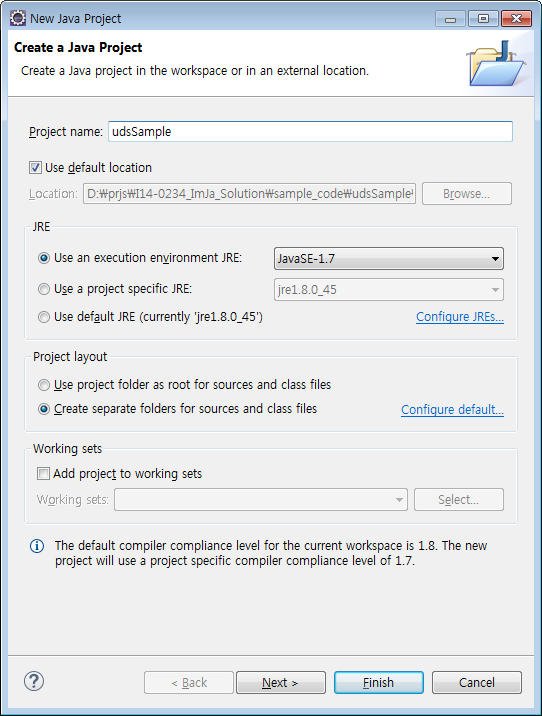
▲ UDS 샘플에 맞추어 프로젝트 이름을 udsSample로 정했습니다.
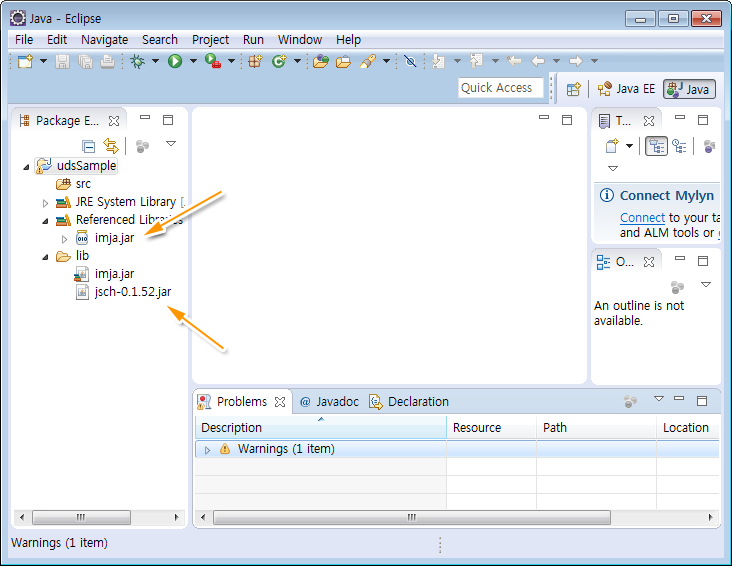
▲ 프로젝트가 생성되었습니다. 아래 글을 참고해서 jsch.jar과 imja.jar 라이브러리를 추가합니다.
필요한 라이브러리가 추가되었습니다. 이제 소스 코드를 작성하면 됩니다.
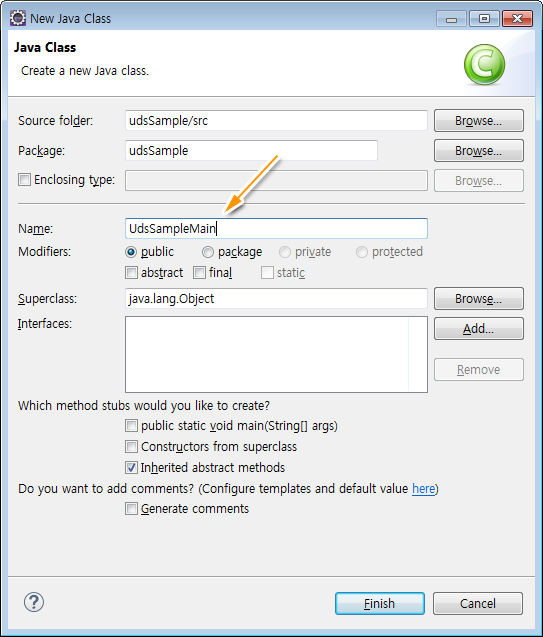
▲ src 폴더를 마오른쪽 버튼 클릭 후 New>>Class를 실행합니다. 샘플 객체 이름을 udsSampleMain이라고 입력합니다.
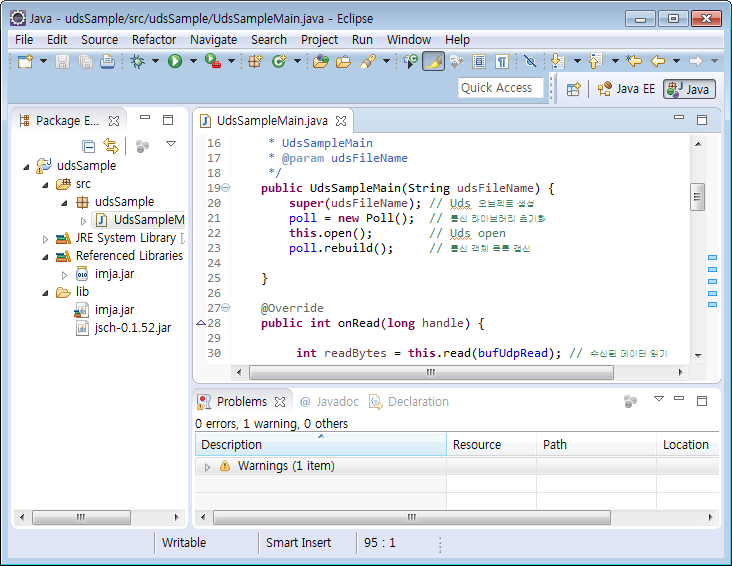
▲ udpSampleMain에 프로그램 소스 코드를 입력합니다.
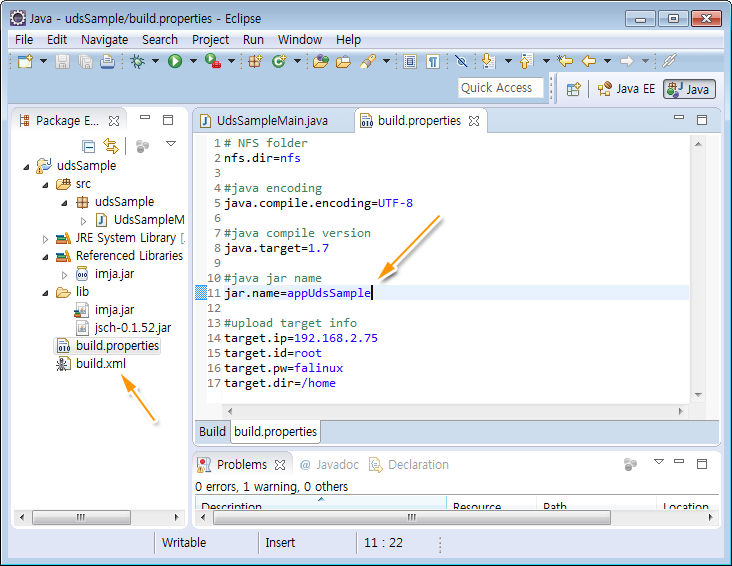
▲ 소스 코드를 작성했으니 Build.xml과 build.propertyiies를 생성합니다. Build.xml과 build.propertyiies 내용은 아래와 같습니다.
>>> Build.xml
<?xml version="1.0" encoding="UTF-8"?>
<!-- 프로젝트 이름을 입력한다. -->
<project name= "ImJa_example" basedir= ".">

         <!-- 빌드 프로퍼티 파일 -->
         <property file= "build.properties" />

         <!-- Java Compile-->
         <target name= "compile" description= "Compile!!!" depends= "">
                <echo message="------------------------------" />
                <echo message="Java Compile!!!!  " />
                <echo message="------------------------------" />
                <javac target= "${java.target}"
                        nowarn="true"
                        deprecation="true"
                        debug="true"
                        listfiles="false"
                        failonerror="true"
                        optimize="false"
                        includeantruntime="false"
                        srcdir="${basedir}/src"
                        destdir="${basedir}/bin"
                        encoding="${java.compile.encoding}">
                </javac>
         </target>

         <!-- make jar-->
         <target name= "make_jar_nfs" depends= "compile">
                <echo message="------------------------------" />
                <echo message=" Make Jar : ${jar.name}.jar" />
                <echo message="------------------------------" />
                <mkdir dir= "./jar" />
                <jar destfile="${nfs.dir}/${jar.name}.jar" basedir="${basedir}/bin">
                </jar>
         </target>

         <!-- target device upload-->
         <target name= "target_device_upload" depends= "make_jar_nfs">
                <echo message="------------------------------" />
                <echo message=" Target device Upload" />
                <echo message="------------------------------" />
           <scp  file="${nfs.dir}/${jar.name}.jar"
            todir="${target.id}@${target.ip}:${target.dir}"
            password="${target.pw}"
                 trust="true"/>
         </target>

</project>
>>> build.propertyiies
# NFS folder
nfs.dir=nfs

#java encoding
java.compile.encoding=UTF-8

#java compile version
java.target=1.7

#java jar name
jar.name=appUdsSample

#upload target info
target.ip=192.168.2.75
target.id=root
target.pw=falinux
target.dir=/home
build.propertyiies를 보면 생성할 실행 파일 이름은 appUdsSample이고 ImJa 보드의 IP는 192.168.2.75, 로그인 ID와 암호는 각각 root에 falinux이며, 실행 파일 저장 위치는 /home이 되겠습니다.
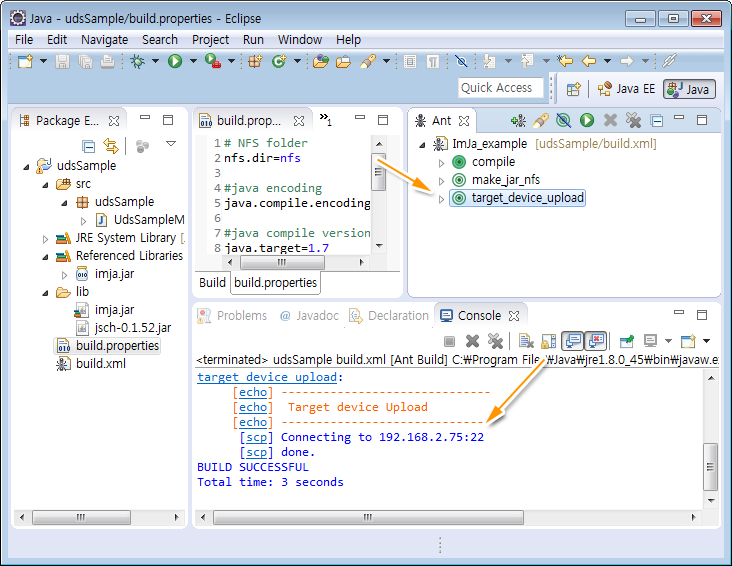 ▲ Ant 스크립트를 이용하여 소스 파일을 컴파일하고 ImJa 보드로 실행 파일을 전송합니다.
ImJa 보드에서 예제 실행 파일을 실행합니다. 실행 방법은 위 이미지에서처럼 아래와 같이 입력하여 실행합니다.
]# java -cp appUdsSample.jar udsSample.UdsSampleMain
자, 샘플을 실행해야 하는데, 결과를 보기 위해서는 appUdsSample에 UDS를 이용하여 문자열을 전송해 주는 샘플이 하나 더 필요합니다. 지금까지의 프록젝트 생성 방법을 참고하셔서 appUdsTester를 생성합니다.
package udsTester;

import java.nio.ByteBuffer;
import com.falinux.imja.Poll;
import com.falinux.imja.Uds;

public class UdsTesterMain extends Uds {


    private Poll poll = null;

    private final ByteBuffer bufUdpRead = ByteBuffer.allocateDirect(1024);
    private final ByteBuffer bufUdpWrite = ByteBuffer.allocateDirect(1024);

    /**
     * UdsTesterMain
     * @param udsFileName
     */
	public UdsTesterMain(String udsFileName) {
		super(udsFileName);	// Uds 오브젝트 생성
		poll = new Poll();	// 통신 라이브러리 초기화
		this.open();		// Uds open
		poll.rebuild();		// 통신 객체 목록 갱신

	}

	@Override
	public int onRead(long handle) {

	     int readBytes = this.read(bufUdpRead);	// 수신된 데이터 읽기

	     byte[] buf = new byte[readBytes];		// byte배열 설정

	     bufUdpRead.flip();						// 읽은 데이터 설정
	     bufUdpRead.get(buf);					// 데이터를 byte배열에 설정


	     System.out.print("received from 1st:");			// 받은데이터 문자열 출력
	     System.out.println(new String(buf));	// 받은데이터 문자열 출력

	     bufUdpRead.compact();					// bytebuff포지션 재설정

	     return readBytes;

	}

	@Override
	public int onWrite(long handle) {
		// TODO Auto-generated method stub
		return 0;
	}

	@Override
	public int onError(long handle) {
		// TODO Auto-generated method stub
		return 0;
	}

	@Override
	public int onHup(long handle) {
		// TODO Auto-generated method stub
		return 0;
	}

	@Override
	public int onTimeOut(long handle) {
		// TODO Auto-generated method stub
		return 0;
	}

	@Override
	public int onDisconnect(long handle) {
		// TODO Auto-generated method stub
		return 0;
	}

	public void run () {
    	    long tmCurrent = 0L;
            long tmBefore = 0L;

            while (true) {

                poll.pollDoLoop(100);

                tmCurrent = System.currentTimeMillis();
                if ((tmCurrent - tmBefore) > 1000) {
                     tmBefore = tmCurrent;
                     bufUdpWrite.put( "2nd message".getBytes());
       	     	     bufUdpWrite.flip();
        	     this.write(bufUdpWrite, "/tmp/1st.uds");
        	         bufUdpWrite.compact();
                }
            }
	}


	public static void main(String args[]) {

		new UdsTesterMain("/tmp/2nd.uds").run();
	}
}
appUdsTester는 아래 명령으로 실행하면 됩니다.
]# java -cp appUdsTester.jar udsTester.UdsTesterMain
appUdsSample가 실행된 상태에서 appUdsTester를 실행하면 1초마다 appUdsTester에서 appUdsSample로 문자열이 전송됩니다. 실행되는 모습은 아래와 같습니다.
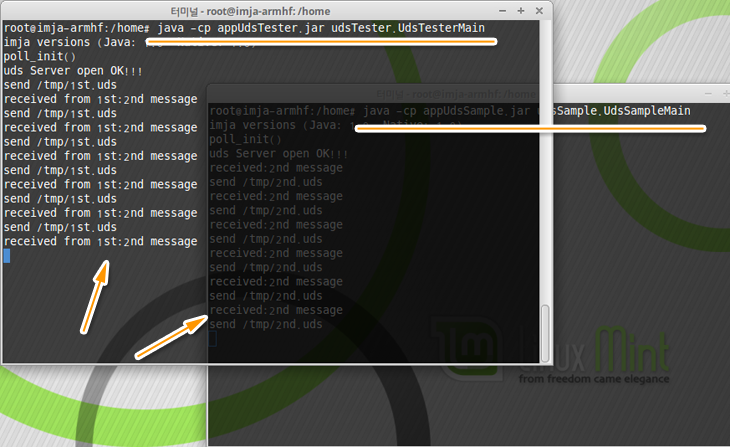
UDS도 역시 ImJa 라이브러리를 이용하면 TCP/IP, UDP/IP, CAN, 시리얼 통신처럼 같은 방식으로 프로그램을 작성할 수 있습니다. 통신 방식은 달라도 프로그램 코딩 방법은 같아서 ImJa 라이브러리를 이용하면 프로그램을 쉽게 작성할 수 있고 관리하기가 편합니다.
다음 시간에는 UDS 샘플 코드에 대해 자세히 설명하겠습니다.
