강좌 & 팁


CanvasRenderingContext2D.drawImage()

설명
패쓰로 지정된 도형을 클립 영역으로 지정한다.
분류
경로 API
형태
- Image -
void CancasRenderingContext2D.drawImage
(in HTMLImageElement image, in float dx, in float dy, optional in float dw, in float dh);
void CancasRenderingContext2D.drawImage
(in HTMLImageElement image, in float sx, in float sy, in float sw, in float sh
in float dx, in float, dy, in float dw, in float dh);
- Canvas -
void CancasRenderingContext2D.drawImage
(in HTMLCanvasElement image, in float dx, in float dy, optional in float dw, in float dh);
void CancasRenderingContext2D.drawImage
(in HTMLCanvasElement image, in float sx, in float sy, in float sw, in float sh
in float dx, in float, dy, in float dw, in float dh);
- Video -
void CancasRenderingContext2D.drawImage
(in HTMLVideoElement image, in float dx, in float dy, optional in float dw, in float dh);
void CancasRenderingContext2D.drawImage
(in HTMLVideoElement image, in float sx, in float sy, in float sw, in float sh
in float dx, in float, dy, in float dw, in float dh);
인수
in HTMLImageElement image 그림 이미지
in HTMLCanvasElement image 캔버스 이미지
in HTMLVideoElement image 비디오 이미지
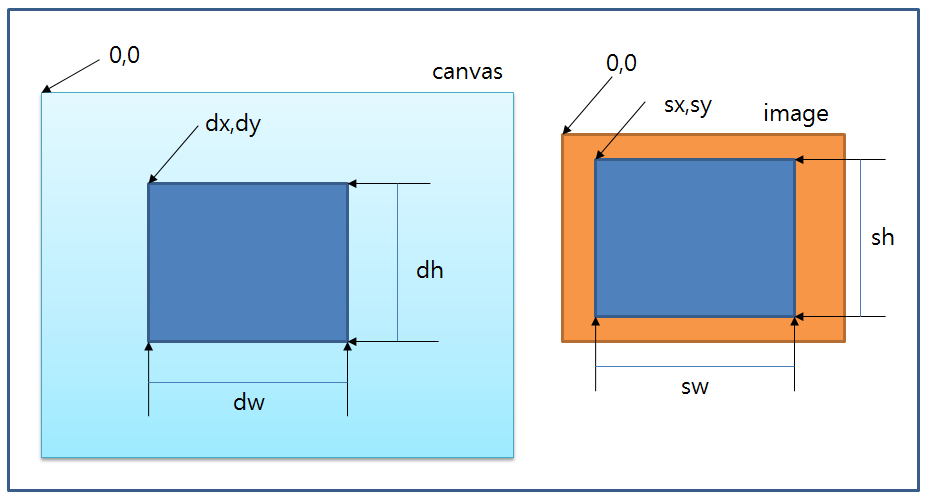
in float dx 이미지가 그려질 위치 가로 좌표
in float dy 이미지가 그려질 위치 세로 좌표
in float dw 그려질 이미지의 가로 폭
in float dh 그려질 이미지의 세로 폭
in float sx 원 이미지에서 그려질 부분의 가로 시작 좌표
in float sy 원 이미지에서 그려질 부분의 세로 시작 좌표
in float sw 원 이미지에서 그려질 부분의 가로 폭
in float sh 원 이미지에서 그려질 부분의 세로 폭
반환
없음
예제
<html>
<head>
<script type="application/javascript">
function draw() {
var canvas = document.getElementById("canvas");
if (canvas.getContext) {
var ctx = canvas.getContext("2d");
var img = new Image();
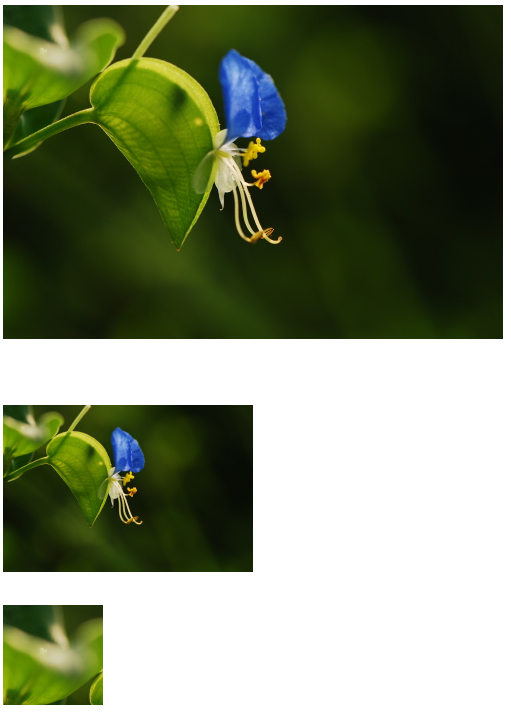
img.src = "flower.jpeg";
img.onload = function(){
ctx.drawImage(img,0,0);
ctx.drawImage(img,0,400,img.width*0.5, img.height*0.5);
ctx.drawImage(img,0,0,100,100,0,600,100,100);
}
}
}
</script>
</head>
<body onload="draw();">
<canvas id="canvas" width="500" height="1000"></canvas>
</body>
</html>
결과