


강좌 & 팁


2012.10.22 10:12:00 (*.52.177.29)
69264

안녕하세요.
유형석입니다.
이번에는 자바 프로그래밍 팁하나 알려 드리도록 하겠습니다.
1. 상황
자바 SWT라이브러리를 이용하여 GUI 제작 도중
shell 을 만들고 배경을 깔았습니다.
그 다음에 라벨과 버튼등을 만들었는데 라벨과 버튼 크기만큼의 공간에는 shell 배경이 안보이는 현상이 발생한거죠.

그림으로 보면 위와 같은 모습입니다.
이럴때를 위한 샘플 코드 하나 알려 드리겠습니다~
2. 방법
 /*******************************************************************************
 * Copyright (c) 2000, 2006 IBM Corporation and others.
 * All rights reserved. This program and the accompanying materials
 * are made available under the terms of the Eclipse Public License v1.0
 * which accompanies this distribution, and is available at
 * http://www.eclipse.org/legal/epl-v10.html
 *
 * Contributors:
 *     IBM Corporation - initial API and implementation
 *******************************************************************************/
/*
 * Composite Snippet: inherit a background color or image
 *
 * For a list of all SWT example snippets see
 * http://www.eclipse.org/swt/snippets/
 *
 * @since 3.2
 */

import org.eclipse.swt.*;
import org.eclipse.swt.graphics.*;
import org.eclipse.swt.layout.*;
import org.eclipse.swt.widgets.*;

public class Form {

public static void main(String[] args) {
	final Display display = new Display();
	final Shell shell = new Shell(display);
	shell.setText("Composite.setBackgroundMode()");
	shell.setLayout(new RowLayout(SWT.VERTICAL));

	Color color = display.getSystemColor(SWT.COLOR_CYAN);

	Group group = new Group(shell, SWT.NONE);
	group.setText("SWT.INHERIT_NONE");
	group.setBackground(color);
	group.setBackgroundMode(SWT.INHERIT_NONE);
	createChildren(group);

	group = new Group(shell, SWT.NONE);
	group.setBackground(color);
	group.setText("SWT.INHERIT_DEFAULT");
	group.setBackgroundMode(SWT.INHERIT_DEFAULT);
	createChildren(group);

	group = new Group(shell, SWT.NONE);
	group.setBackground(color);
	group.setText("SWT.INHERIT_FORCE");
	group.setBackgroundMode(SWT.INHERIT_FORCE);
	createChildren(group);

	shell.pack();
	shell.open();
	while(!shell.isDisposed()) {
		if(!display.readAndDispatch()) display.sleep();
	}
	display.dispose();
}
static void createChildren(Composite parent) {
	parent.setLayout(new RowLayout());
	List list = new List(parent, SWT.BORDER | SWT.MULTI);
	list.add("List item 1");
	list.add("List item 2");
	Label label = new Label(parent, SWT.NONE);
	label.setText("Label");
	Button button = new Button(parent, SWT.RADIO);
	button.setText("Radio Button");
	button = new Button(parent, SWT.CHECK);
	button.setText("Check box Button");
	button = new Button(parent, SWT.PUSH);
	button.setText("Push Button");
	Text text = new Text(parent, SWT.BORDER);
	text.setText("Text");
   }
}
3. 결과
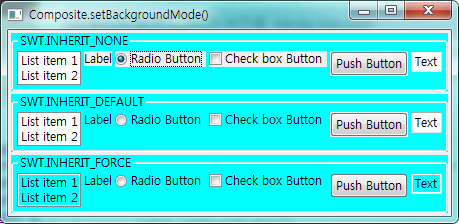
4. 참고
setBackgroundMode(int type)

는 shell, composite, group에 모두 사용 할 수 있습니다.
인자 값으로는 결과 그림과 같이
SWT.INHERIT_NONE
SWT.INHERIT_DEFAULT
SWT.INHERIT_FORCE
가 있습니다.
각각의 설명은 따로하지 않고 결과 그림을 보시면 이해가 되실겁니다.
자신의 상황에 맞게 사용하면 좋을것 같네요!
오늘은 여기 까지!
짧은 글 읽어 주셔서 감사합니다!
