강좌 & 팁


- Point, Rectangle, Dimension 클래스
→ 애플릿에서 main()은 웹 브라우저 or 애플릿 뷰어이다.
→ 즉, 웹브라우져 안에는 모바일 자바 가상머신이 포함되어 있다.
- Color 클래스
→ 화면의 색은 Color 클래스의 객체에 의해서 생성된다.
→ 색상은 기본 Red, Green, Blue의 혼합으로 결정
→ 세가지 기본 색상의 농도는 0~255사이의 정수값이나, 0~1.0까지의 실수값으로 나타낼 수 있으며 , 적색, 녹색, 청색의 순으로 표시
→ 세가지 색은 각각 256가지의 농도이며 조합하여 1600만색을 만들 수 있다.
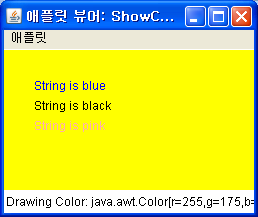
→ 예제
// 노란색 바탕의 애플릿에 푸른색과 검정색으로 글씨를 쓰는 프로그램
import java.applet.Applet;
import java.awt.*;
public class ShowColor extends Applet
{
public void paint (Graphics g)
{
setBackground (Color.yellow);
g.setColor (Color.blue);
g.drawString ("String is blue", 30, 40);
g.setColor (Color.black);
g.drawString ("String is black", 30, 60);
g.setColor (Color.pink);
g.drawString ("String is pink", 30, 80);
// 아래를 보려면 애플릿 뷰어로 봐야 한다.
showStatus ("Drawing Color: " + g.getColor());
setSize(250,140);
}
}
import java.applet.Applet;
import java.awt.*;
public class ShowColor extends Applet
{
public void paint (Graphics g)
{
setBackground (Color.yellow);
g.setColor (Color.blue);
g.drawString ("String is blue", 30, 40);
g.setColor (Color.black);
g.drawString ("String is black", 30, 60);
g.setColor (Color.pink);
g.drawString ("String is pink", 30, 80);
// 아래를 보려면 애플릿 뷰어로 봐야 한다.
showStatus ("Drawing Color: " + g.getColor());
setSize(250,140);
}
}
→ 실행 결과
- Font 클래스
→ Font 클래스는 글꼴이나 크기 정보 등을 가지고 있다.
→ Font 클래스의 생성자 Font(String FontName, int style, int size)
→ 인수는 각각 폰트의 이름, 모양, 크기를 넣는다.
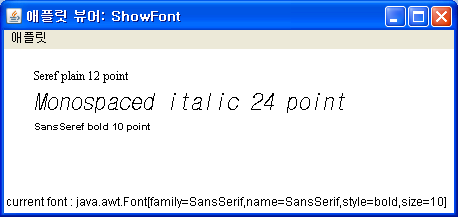
→ 예제
// 여러가지 폰트와 스타일의 글체를 출력하는 프로그램
import java.applet.Applet;
import java.awt.Graphics;
import java.awt.Font;
public class ShowFont extends Applet
{
public void paint(Graphics g)
{
Font serif = new Font("Serif", Font.PLAIN, 12);
Font monospaced = new Font("Monospaced", Font.ITALIC, 24);
Font sansSerif = new Font("SansSerif", Font.BOLD, 10);
g.setFont(serif);
g.drawString("Seref plain 12 point", 30, 30);
g.setFont(monospaced);
g.drawString("Monospaced italic 24 point", 30, 60);
g.setFont(sansSerif);
g.drawString("SansSeref bold 10 point", 30, 80);
showStatus("current font : " + g.getFont().toString());
}
}
import java.applet.Applet;
import java.awt.Graphics;
import java.awt.Font;
public class ShowFont extends Applet
{
public void paint(Graphics g)
{
Font serif = new Font("Serif", Font.PLAIN, 12);
Font monospaced = new Font("Monospaced", Font.ITALIC, 24);
Font sansSerif = new Font("SansSerif", Font.BOLD, 10);
g.setFont(serif);
g.drawString("Seref plain 12 point", 30, 30);
g.setFont(monospaced);
g.drawString("Monospaced italic 24 point", 30, 60);
g.setFont(sansSerif);
g.drawString("SansSeref bold 10 point", 30, 80);
showStatus("current font : " + g.getFont().toString());
}
}
→ 실행 결과
- FontMatrics 클래스
→ Font의 크기에 대한 상세한 정보가 정의되어 있다.
→ FontMatrics 객체는 Component 클래스에 정의된 getFontMatrics() 메소드로 구한다.
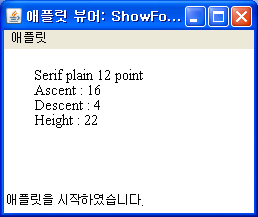
→ 예제
// FontMetrics 객체를 이용하여 폰트에 관한 정보를 검색하는 프로그램
import java.applet.Applet;
import java.awt.*;
public class ShowFontMetrics extends Applet
{
public void paint(Graphics g)
{
Font serif = new Font("Serif", Font.PLAIN, 15);
g.setFont(serif);
g.drawString("Serif plain 12 point", 30, 30);
int ascent, descent, height, leading;
ascent = g.getFontMetrics().getAscent();
descent = g.getFontMetrics().getDescent();
height = g.getFontMetrics().getHeight();
leading = g.getFontMetrics().getLeading();
g.drawString("Ascent : " + ascent, 30, 45);
g.drawString("Descent : " + descent, 30, 60);
g.drawString("Height : " + height, 30, 75);
g.drawString("Leading : " + leading, 30, 90);
setSize(250, 140);
}
}
import java.applet.Applet;
import java.awt.*;
public class ShowFontMetrics extends Applet
{
public void paint(Graphics g)
{
Font serif = new Font("Serif", Font.PLAIN, 15);
g.setFont(serif);
g.drawString("Serif plain 12 point", 30, 30);
int ascent, descent, height, leading;
ascent = g.getFontMetrics().getAscent();
descent = g.getFontMetrics().getDescent();
height = g.getFontMetrics().getHeight();
leading = g.getFontMetrics().getLeading();
g.drawString("Ascent : " + ascent, 30, 45);
g.drawString("Descent : " + descent, 30, 60);
g.drawString("Height : " + height, 30, 75);
g.drawString("Leading : " + leading, 30, 90);
setSize(250, 140);
}
}
→ 실행 결과
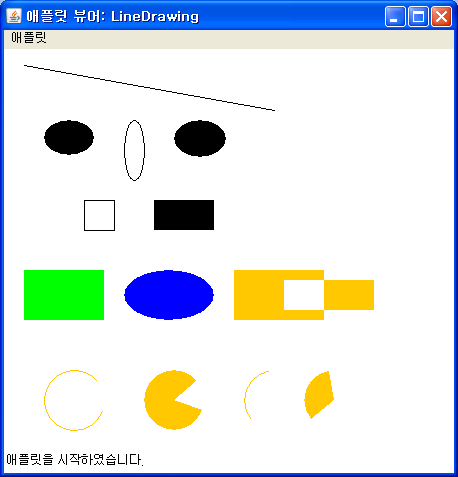
- 직선, 원, 사각형, XOR, 부채꼴 모드 그리기
→ 예제
// 직선을 그리는 프로그램
import java.applet.Applet;
import java.awt.Graphics;
import java.awt.Color;
public class LineDrawing extends Applet
{
public void paint(Graphics g)
{
// 직선
g.drawLine(20, 15, 270, 60);
// 원
g.fillOval(40, 70, 50, 35);
g.drawOval(120, 70, 20, 60);
g.fillOval(170, 70, 52, 37);
// 사각형
g.drawRect(80, 150, 30, 30);
g.fillRect(150, 150, 60, 30);
// XOR 모드
g.setColor (Color.green);
g.fillRect (20, 220, 80, 50);
g.setColor (Color.blue);
g.fillOval (120, 220, 90, 50);
setBackground (Color.white);
g.setXORMode (Color.white);
g.setColor (Color.orange);
g.fillRect (230, 220, 90, 50);
g.fillRect (280, 230, 90, 30);
// 부채꼴
g.drawArc(40, 320, 60, 60, 40, 300);
g.fillArc(140, 320, 60, 60, 40, 300);
g.drawArc(240, 320, 60, 60, 100, 120);
g.fillArc(300, 320, 60, 60, 100, 120);
setSize(450, 400);
}
}
import java.applet.Applet;
import java.awt.Graphics;
import java.awt.Color;
public class LineDrawing extends Applet
{
public void paint(Graphics g)
{
// 직선
g.drawLine(20, 15, 270, 60);
// 원
g.fillOval(40, 70, 50, 35);
g.drawOval(120, 70, 20, 60);
g.fillOval(170, 70, 52, 37);
// 사각형
g.drawRect(80, 150, 30, 30);
g.fillRect(150, 150, 60, 30);
// XOR 모드
g.setColor (Color.green);
g.fillRect (20, 220, 80, 50);
g.setColor (Color.blue);
g.fillOval (120, 220, 90, 50);
setBackground (Color.white);
g.setXORMode (Color.white);
g.setColor (Color.orange);
g.fillRect (230, 220, 90, 50);
g.fillRect (280, 230, 90, 30);
// 부채꼴
g.drawArc(40, 320, 60, 60, 40, 300);
g.fillArc(140, 320, 60, 60, 40, 300);
g.drawArc(240, 320, 60, 60, 100, 120);
g.fillArc(300, 320, 60, 60, 100, 120);
setSize(450, 400);
}
}
→ 실행 결과